Getting Started
This guide provides a complete walkthrough on how to create and execute bigraphical reactive systems (BRS). The following aspects are covered:
- Specification of the signature
- Specification of the initial state
- Specification of the reaction rules
This is done using a running example.
Scenario Description
The running example describes a "system", where a user can put a fruit into a basket.
The environment of this "system" comprises a Table, a Basket, some generic Fruit entities and a User.
Only one high-level action exists, namely, picking a fruit and placing it into the available Basket.
This simple system description might sound simple but when more users and baskets are introduced the problem becomes more challenging to manage.
This type of problem involves concurrent behavior and dynamic allocation and arises from a category of complex problems in the field of computer science that are generally hard to solve.
In the following, we are going to translate this scenario description into a BRS-based specification and explore the full state-space. That allows us to observe the overall behavior of the system and also take snapshots of the states over time.
The Signature
import org.bigraphs.framework.core.*;
import org.bigraphs.framework.core.impl.pure.*;
import org.bigraphs.framework.core.impl.signature.*;

import static org.bigraphs.framework.core.factory.BigraphFactory.*;

public static DynamicSignature createSignature() {
    DynamicSignatureBuilder defaultBuilder = pureSignatureBuilder();
    defaultBuilder
        .add("User", 1, ControlStatus.ATOMIC)
        .add("Basket", 1)
        .add("Fruit", 1, ControlStatus.ATOMIC)
        .add("Table", 0)
    ;
    return defaultBuilder.create();
}
Because the User, Basket and Fruit entities will have to synchronize during the pick and place task, they all have arity 1.
That is, they can connect to a link (also called channel) to indicate a synchronisation action on distributed locations.
The property ATOMIC indicates that this entities cannot contain any children.
The Initial State of the System

The User and Basket are not connected to any link. Their ports are idle.
Bigraphs can be exported using the Visualization Module of Bigraph Framework. See, for example, Exporting Bigraphs as Images on how to export a bigraph as PNG using the DOT format.
import org.bigraphs.framework.core.*;
import org.bigraphs.framework.core.impl.pure.*;
import org.bigraphs.framework.core.impl.signature.*;
import org.bigraphs.framework.core.exceptions.*;

import static org.bigraphs.framework.core.factory.BigraphFactory.*;

public static PureBigraph createAgent() throws InvalidConnectionException {
    return pureBuilder(createSignature()).root()
        .child("User")
        .child("Table").down()
        .child("Basket")
        .child("Fruit", "f")
        .child("Fruit", "f")
        .child("Fruit", "f")
        .create();
}
Reaction Rules
The high-level pick and place action of our system under consideration has to be decomposed into four smaller "interlocking" steps.
Each step ensures that the entire action can actually be executed.
This is done by acquiring a connection first to the Fruit entities (if one is available), and afterward also to the Basket entity as long as nothing is connected to it.
This can also be thought as a "locking" mechanism to handle concurrency.
The last rule finally transfers a Fruit entity to the Basket entity.
Since all Fruits share the same link f, any fruit will be picked as long one is available.
It can be thought of an m:1 queue (input size m, output size 1).
The role of the User in this system is to provide an indication of who has performed the action.
The fruit transfer rule could have been written also without the user.
The last rule simply releases all "locks" so that the procedure can be repeated with any other User and Fruit in the system.
The amount of details of a specification is domain-specific and depends on the specific use case.
Reaction Rule 1: Lock the Fruit
A "lock" is acquired on any Fruit on the Table by a "free" User:
import org.bigraphs.framework.core.impl.pure.*;
import org.bigraphs.framework.core.impl.signature.*;
import org.bigraphs.framework.core.reactivesystem.*;
import org.bigraphs.framework.core.exceptions.*;

import static org.bigraphs.framework.core.factory.BigraphFactory.*;

public static ParametricReactionRule<PureBigraph> createRR1() throws InvalidReactionRuleException, InvalidConnectionException {
    PureBigraphBuilder<DynamicSignature> b1 = pureBuilder(createSignature());
    PureBigraphBuilder<DynamicSignature> b2 = pureBuilder(createSignature());
    b1.root()
        .child("User")
        .child("Table").down()
        .child("Fruit", "f").site()
    ;
    b2.root()
        .child("User", "f")
        .child("Table").down()
        .child("Fruit", "f").site()
    ;
    PureBigraph redex = b1.create();
    PureBigraph reactum = b2.create();
    ParametricReactionRule<PureBigraph> rr = new ParametricReactionRule<>(redex, reactum).withLabel("rr1");
    return rr;
}
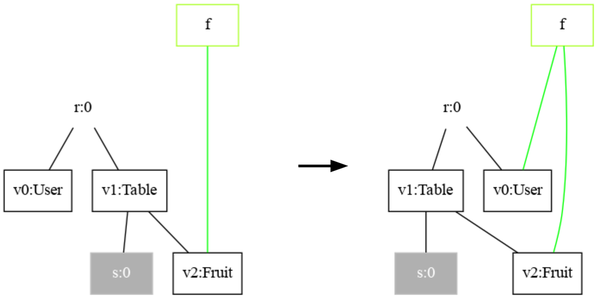
A User is "free" as long as its single port is not connected to any open link. The right-hand side assigns a Fruit to a User.
Reaction Rule 2: Lock the Basket
A "lock" is acquired on the Basket if a User has already ensured to receive a Fruit:
import org.bigraphs.framework.core.impl.pure.*;
import org.bigraphs.framework.core.impl.signature.*;
import org.bigraphs.framework.core.reactivesystem.*;
import org.bigraphs.framework.core.exceptions.*;

import static org.bigraphs.framework.core.factory.BigraphFactory.*;

public static ParametricReactionRule<PureBigraph> createRR2() throws InvalidReactionRuleException, InvalidConnectionException {
    PureBigraphBuilder<DynamicSignature> b1 = pureBuilder(createSignature());
    PureBigraphBuilder<DynamicSignature> b2 = pureBuilder(createSignature());
    b1.root()
        .child("User", "f")
        .child("Table").down()
        .child("Fruit", "f").site()
        .child("Basket").down().site()
    ;
    b2.root()
        .child("User", "f")
        .child("Table").down()
        .child("Fruit", "f").site()
        .child("Basket", "f").down().site()
    ;
    PureBigraph redex = b1.create();
    PureBigraph reactum = b2.create();
    ParametricReactionRule<PureBigraph> rr = new ParametricReactionRule<>(redex, reactum).withLabel("rr2");
    return rr;
}

If this rule matches the setup is complete.
Reaction Rule 3: Transfer the Fruit
The following rule describes the actual pick and place task of the system.
A Fruit on the Table is transferred to the Basket of the Table:
import org.bigraphs.framework.core.impl.pure.*;
import org.bigraphs.framework.core.impl.signature.*;
import org.bigraphs.framework.core.reactivesystem.*;
import org.bigraphs.framework.core.exceptions.*;

import static org.bigraphs.framework.core.factory.BigraphFactory.*;

public static ParametricReactionRule<PureBigraph> createRR3() throws InvalidReactionRuleException, InvalidConnectionException {
    PureBigraphBuilder<DynamicSignature> b1 = pureBuilder(createSignature());
    PureBigraphBuilder<DynamicSignature> b2 = pureBuilder(createSignature());
    b1.root()
        .child("User", "f")
        .child("Table").down()
        .child("Fruit", "f").site()
        .child("Basket", "f").down().site()
    ;
    b2.root()
        .child("User", "f")
        .child("Table").down()
        .site()
        .child("Basket", "f").down().child("Fruit", "f").site()
    ;
    PureBigraph redex = b1.create();
    PureBigraph reactum = b2.create();
    ParametricReactionRule<PureBigraph> rr = new ParametricReactionRule<>(redex, reactum).withLabel("rr3");
    return rr;
}
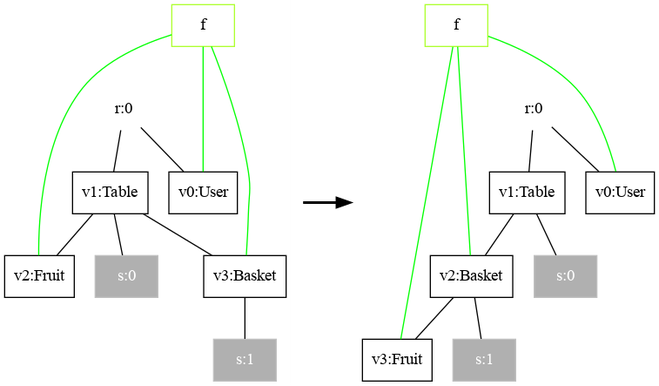
The Fruit is transferred from the Table to the Basket still keeping the reference.
Reaction Rule 4: Release Locks
The transferred Fruit looses the reference to the other Fruits on the Table.
Specifically, it is not connected anymore to the link named f.
Also, the User and Basket are now "free" to connect again after the rule was fired.
import org.bigraphs.framework.core.impl.pure.*;
import org.bigraphs.framework.core.impl.signature.*;
import org.bigraphs.framework.core.reactivesystem.*;
import org.bigraphs.framework.core.exceptions.*;

import static org.bigraphs.framework.core.factory.BigraphFactory.*;

public static ParametricReactionRule<PureBigraph> createRR4() throws InvalidReactionRuleException, InvalidConnectionException {
    PureBigraphBuilder<DynamicSignature> b1 = pureBuilder(createSignature());
    PureBigraphBuilder<DynamicSignature> b2 = pureBuilder(createSignature());
    b1.root()
        .child("User", "f")
        .child("Table").down().site()
        .child("Basket", "f").down().child("Fruit", "f").site()
    ;
    b2.createOuter("f");
    b2.root()
        .child("User")
        .child("Table").down().site()
        .child("Basket").down().child("Fruit").site()
    ;
    PureBigraph redex = b1.create();
    PureBigraph reactum = b2.create();
    ParametricReactionRule<PureBigraph> rr = new ParametricReactionRule<>(redex, reactum).withLabel("rr4");
    return rr;
}
It is important to note that the redex and reactum of a rule are required to have the same outer faces. Thus, the idle outer name f is still needed in the reactum. (Their inner face, i.e., sites, can be different.)
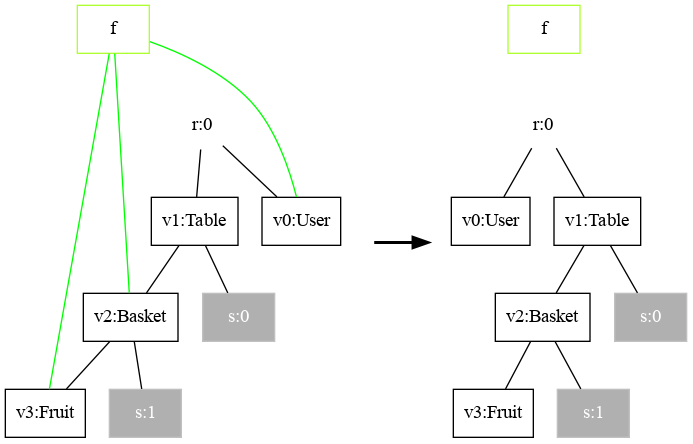
Release all "locks".
Bigraphical Reactive System Specification
A BRS acts as an executable system specification that combines the structural representation of a system with its dynamic evolution semantics. Conceptually, a BRS encapsulates:
- the signature, defining the types and constraints,
- the initial state, and
- the reaction rules, specifying how the system may evolve over time.
The agent and the rules are shown in the following.
Declaration
import org.bigraphs.framework.core.reactivesystem.*;
import org.bigraphs.framework.simulation.matching.pure.*;

PureReactiveSystem rs = new PureReactiveSystem();
rs.setAgent(createAgent());
rs.addReactionRule(createRR1());
rs.addReactionRule(createRR2());
rs.addReactionRule(createRR3());
rs.addReactionRule(createRR4());
assert rs.isSimple();
Execution via Model Checking
This specification can be executed (i.e., verified or simulated) by the model checker class org.bigraphs.framework.simulation.modelchecking.PureBigraphModelChecker, which basically performs an exhaustive breadth-first search on the initial state.
Correctness properties via bigraphical predicates can simply be omitted.
Refer to Model Checking to get to know more about how to use a BRS specification for model checking.
import org.bigraphs.framework.simulation.modelchecking.*;

ModelCheckingOptions opts = ModelCheckingOptions.create();
opts
        .and(transitionOpts()
            .setMaximumTransitions(100)
            .setMaximumTime(60)
            .create()
        )
        .and(ModelCheckingOptions.exportOpts()
            .setReactionGraphFile(new File("transition_graph.png"))
            .setPrintCanonicalStateLabel(false)
            .setOutputStatesFolder(new File("states/"))
            .create()
        )
;

PureBigraphModelChecker modelChecker = new PureBigraphModelChecker(
        rs,
        BigraphModelChecker.SimulationStrategy.Type.BFS,
        opts);
modelChecker.execute();
Termination
The model checking procedure automatically finishes when the system's behavior is finite, or the overall system's behavior is a cycle.
Note that the model checking process may not terminate if the system has infinite behavior. Therefore, it is advised to set constraints such as the maximum allowed duration or maximum number of transitions to explore.
Debugging the Transition System
The output path of the transition system can be specified in the model checking options object (see above). The transition system is a PNG graphic file and shows all possible states and actions for visual exploration and debugging:

The system has three final states and five solutions. Each final state is the same: All Fruits are in the Basket. However, how to reach this solution is different as can be seen by the different paths. The shortest path provides a solution where all Fruits are placed into the Basket one-by-one without calling the release action in-between but only once before the final state. This solution is, however, unfair if multiple Users are involved.
Refer to Model Checking to get to know more about how to use a BRS specification for model checking.
Reaction Graph Object
Another way is by using the reaction graph instance of type ReactionGraph of the model checker object:
import org.bigraphs.framework.core.impl.pure.*;
import org.bigraphs.framework.core.reactivesystem.*;

ReactionGraph<PureBigraph> reactionGraph = modelChecker.getReactionGraph();
The class ReactionGraph inherits from AbstractTransitionSystem and implements the standard methods for transition systems.
The concrete implementation, however, defines the actual data structure of the transition system.
Internally, the reaction graph manages an instance of org.jgrapht.Graph with LabeledNode as states and LabeledEdge as transition relations.
It is a simple directed graph (allowing multiple edges, allowing self loops).
Both the LabeledNode and LabeledEdge class provide getter-methods that return string labels, which denote the name of the bigraph state and rule, respectively, added to the reactive system container.
Programmatic Execution Example
By acquiring a bigraph matcher instance, arbitrary rule execution logic can be implemented:
import org.bigraphs.framework.core.impl.pure.*;
import org.bigraphs.framework.core.reactivesystem.*;
import org.bigraphs.framework.simulation.matching.*;

ParametricReactionRule<PureBigraph> rr11 = createRR1();
AbstractBigraphMatcher<PureBigraph> matcher = AbstractBigraphMatcher.create(PureBigraph.class);
MatchIterable<BigraphMatch<PureBigraph>> match = matcher.match(agent, rr11);
Iterator<BigraphMatch<PureBigraph>> iterator = match.iterator();
while (iterator.hasNext()) {
    BigraphMatch<PureBigraph> next = iterator.next();
    PureBigraph result = rs.buildParametricReaction(agent, next, rr11);
    // do something with `result`
}
The rewrite functionality is provided by the concrete org.bigraphs.framework.core.reactivesystem.ReactiveSystem instance.
Matching and Rewriting API
Having explained the essentials of BRSs until here, the matching and rewriting functionality from the following classes can be used to conveniently execute BRSs in arbitrary ways:
Matching
org.bigraphs.framework.simulation.matching.AbstractBigraphMatcher- This abstract class defines a matcher and needs a host graph and rule to perform bigraph matching.
- A bigraph matcher consists of a bigraph matching engine w.r.t. to the bigraph type.
- The correct one is automatically created using the factory method
#create(Class)by supplying the bigraph class type. - Matches are returned via an iterator (the instances of the matches are of type
BigraphMatch).
Rewriting
org.bigraphs.framework.core.reactivesystem.ReactiveSystem- This interface defines two methods for rewriting after a match was found:
ReactiveSystem#buildGroundReaction(final B agent, final BigraphMatch<B> match, final ReactionRule<B> rule)ReactiveSystem#buildParametricReaction(final B agent, final BigraphMatch<B> match, final ReactionRule<B> rule)- Implementations of this interface:
- Core Module:
org.bigraphs.framework.core.reactivesystem.AbstractSimpleReactiveSystemis an abstract base class for all reactive systems in Bigraph Framework. - Simulation Module:
org.bigraphs.framework.simulation.matching.pure.PureReactiveSystem(extendsAbstractSimpleReactiveSystem) is a concrete implementation of a reactive system for the class of pure bigraphs.
Formal Foundations of Reactions
Process Algebra
In bigraphs, the dynamic behavior of a system under observation is rooted in process algebra (see [2], [3]) and represented by means of reactions written  , where
  denote the system states before and after the application of the reaction rule R.
This rewriting formalism induces an observational semantics, where the meaning of a system is characterized by the observable transitions between bigraphical states.
Generally, a state is a bigraphical snapshot of the system at a specific point in time.
Such a state may represent the system at a level of abstraction and fidelity appropriate for the modelling or analysis task under consideration.
denote the system states before and after the application of the reaction rule R.
This rewriting formalism induces an observational semantics, where the meaning of a system is characterized by the observable transitions between bigraphical states.
Generally, a state is a bigraphical snapshot of the system at a specific point in time.
Such a state may represent the system at a level of abstraction and fidelity appropriate for the modelling or analysis task under consideration.
Founded on the categorical semantics of bigraph theory (see [1]), this reaction formalism together with the underlying bigraph structure enables the specification and execution of dynamic systems (e.g., simulation or formal verification) within a uniform mathematical framework.
Anatomy of Reaction Rules
BRS introduce a time-varying notion to bigraphs through reaction rules. That is, reaction rules enable some kind of simulation of system states, which internally is enabled by means of graph rewriting. The bigraph rewriting formalism allows to synthesize a (potentially infinite) labelled transition system (LTS). Each node of the LTS is a bigraph state. States are connected by edges called transition relations labeled with the reaction rule that led to this state. The LTS can have cycles.
To generate an LTS, reaction rules must be applied. A reaction rule comprises a redex and reactum. That is, a rule consists of a left-hand side, and a right-hand side. The meaning of a rule is as follows: The redex specifies the pre-conditions and the reactum the post-conditions. If the redex could be found in some host bigraph, the matched part of the bigraph is replaced by the reactum. This is also called graph rewriting, which solves the subgraph matching problem.
 Example of a bigraphical reaction rule comprising a redex (left-hand side) and reactum (right-hand side), which both are bigraphs. The rule describes the movement of the smaller circle from one place to another place (larger circles).
Simulating a BRS works as follows: Beginning with a bigraph (i.e., the initial state of the BRS), a set of reaction rules is applied as long as a match can be found, or until some stopping criteria eventuates (such as time, number of states explored, any convergence criteria, etc.). Note that the bigraph and the reaction rules need to be defined over the same signature.
Sometimes a rule can have multiple occurrences in a host graph. Thus, rules are often non-deterministic.
Refer to section Reaction Rules, which explains bigraphical reaction rules in more detail.
Bigraphical reaction rules enable a form of the more general rule-based programming paradigm. Therefore, you can use advanced rule strategies to control the execution order of rules.
References
[1] Milner, Robin: The Space and Motion of Communicating Agents. 1st ed. New York, NY, USA: Cambridge University Press, 2009. ISBN 978-0-521-73833-0.
[2] Bergstra, J.A.; Ponse, A.; Smolka, S.A.: Handbook of Process Algebra. Amsterdam, North-Holland / Elsevier, 2001.
[3] Fokkink W: Introduction to Process Algebra. Springer-Verlag, Berlin Heidelberg, 2000.